- Informatii telefonice:(+40) 748 400 200


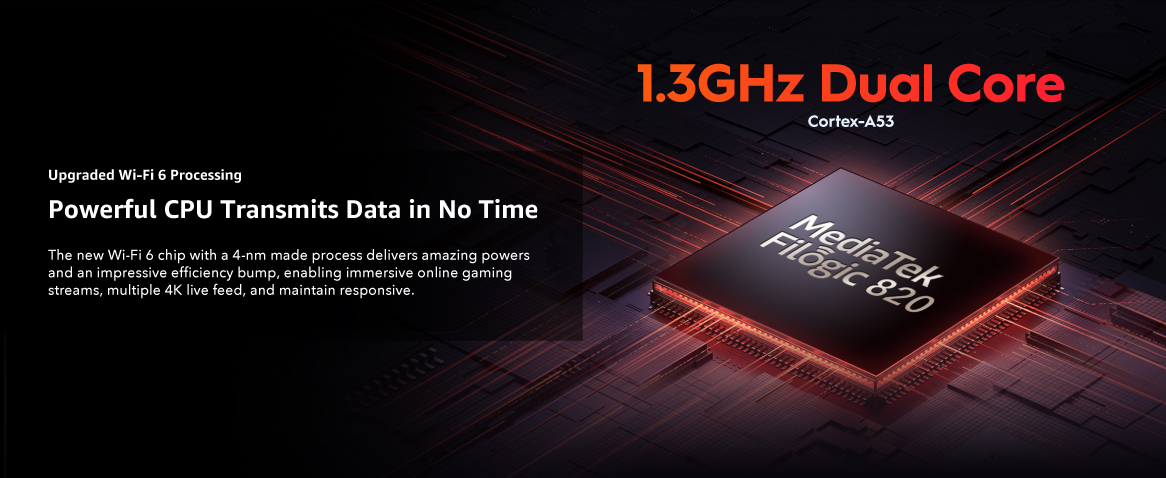
Cudy Router Wireless Cudy WR3000, AX3000, Dual-Band, Wi-Fi 6, 574 MB/s, 2402 MB/s, Dual-Core 1.3GHz, Cudy Mesh
Cod intern: xsales_180504884Producator: Cudy
Vizualizari: 24 / Achizitii: 9
Stoc: In stoc
Acest produs este publicat in categoria Electronice si IT la data de 19-02-2026: 05:02 si vandut de Dwyn. Vanzatorul isi asuma corectitudinea datelor publicate.
( alege finantarea potrivita )
📈 Pret actualizat: 19/05/2026 12:47 pm
-
Produs cu garantie
-
Livrare direct din stocul fizic al Dwyn
-
Retur gratuit minim 14 zile de la data achizitiei
| ||
 | ||
Acoperire crescuta, latenta mai mica | ||
| Directia detectata, semnal confirmat Beamforming detecteaza directia dispozitivelor conectate si modeleaza un semnal focalizat catre acestea pentru a imbunatati acoperirea. |
| Combo-uri mai usoare in jocuri Standardul Wi-Fi 6 imbunatatit include MU-MIMO si OFDMA, care ofera o capacitate de retea de pana la 8X (2,4GHz) si 16X (5GHz) pentru a raspunde mai rapid chiar si la cerinte mai mari. |
 | ||
| Router Wi-Fi Daca accesul la Internet de la DSL sau modemul prin cablu este disponibil pentru un utilizator, dar mai multi utilizatori trebuie sa partajeze Internetul, va rugam sa utilizati modul Router. | ||
| Extensor Wi-Fi Modul Wi-Fi Extender (repetitor) extinde acoperirea Wi-Fi la zona greu de acoperit. *Se asteapta la versiunea de firmware 1.15.5+. | ||
| AP fara fir Modul AP wireless este mai folosit pentru a transfera conexiunea prin cablu la wireless. Este de obicei in spatele unui router si nu are DHCP. | ||
| WISP WISP extinde Wi-Fi, dar creeaza o subretea pentru dispozitivele conectate, facandu-l mai sigur decat modul extender. | ||
| Server si client VPN Protocoalele VPN populare permit lucrul de acasa si accesul securizat de la distanta cu sprijinul lui. |
|  |
| Criptare DNS Protejati-va istoricul de navigare impotriva scurgerilor cu DNS prin TLS de la Cloudflare, Google si Quad9. |
| |
| Cudy Mesh este gata Accepta Cudy Mesh pentru a permite roaming fara intreruperi in intreaga casa cu alte dispozitive Cudy Mesh. |
| |
Alte produse din aceeasi categorie:









Livrare rapida
oriunde in Romania si retur gratuit timp de minim 14 zile.

Plati sigure
ramburs sau cu cardul online, chiar si in rate fara dobanda.

Magazine verificate
si populare, cu peste 1 milion de produse disponibile oricand.

Suport tehnic
Ai o intrebare? Contacteaza-ne telefonic sau trimite-ne un mesaj.
Suntem cel mai mare agregator de magazine online si produse la reducere din Romania functionand in sistem Search > Click > Buy.
- AXWELL SERV SRL
RO24613290 / J17/147/2018 -
Adresa:
Al. Strandului #3, Tecuci
805300, Galati, Romania - Telefon: (+40) 748 400 200

Scrie parerea ta
Cudy Router Wireless Cudy WR3000, AX3000, Dual-Band, Wi-Fi 6, 574 MB/s, 2402 MB/s, Dual-Core 1.3GHz, Cudy Mesh
Ai cumparat produsul Cudy Router Wireless Cudy WR3000, AX3000, Dual-Band, Wi-Fi 6, 574 MB/s, 2402 MB/s, Dual-Core 1.3GHz, Cudy Mesh ?
Lasa o nota si parerea ta completand formularul alaturat.
<table style=width: 857px; height: 2293px;> <tbody> <tr style=height: 196px;> <td style=width: 857px; height: 196px; colspan=3> <ul> <li>Super rapid AX3000 Wi-Fi 6</li> <li>CPU Cortex-A53 dual-core de 1,3 GHz</li> <li>4 porturi Ethernet 10/100/1000Mbps</li> <li>Latimea canalului de 160 MHz</li> <li>DL/UL OFDMA si DL/UL MU-MIMO</li> <li>Server si client Wireguard/OpenVPN/L2TP/PPTP VPN</li> <li>Cudy Mesh</li> <li>IPv4/IPv6</li> <li>TR069/TR098/TR181/TR111</li> </ul> </td> </tr> <tr style=height: 341px;> <td style=width: 857px; height: 341px; colspan=3> <figure class=image image-style-align-center style=width: 800px;><img class=lazy style=width: 800px; src=https://nwzimg.wezhan.cn/contents/sitefiles2019/10096568/images/44360739.jpg alt= width= height= align= data-src=https://nwzimg.wezhan.cn/contents/sitefiles2019/10096568/images/44360739.jpg data-loaded=1 /></figure> </td> </tr> <tr style=height: 55px;> <td style=width: 857px; height: 55px; colspan=3> <h4 style=text-align: center;><strong>Acoperire crescuta, latenta mai mica</strong></h4> </td> </tr> <tr style=height: 133px;> <td style=width: 418px; height: 133px;> <p style=text-align: center;><strong>Directia detectata, semnal confirmat</strong></p> <p style=text-align: center;>Beamforming detecteaza directia dispozitivelor conectate si modeleaza un semnal focalizat catre acestea pentru a imbunatati acoperirea.</p> </td> <td style=width: 4px; height: 133px;> <p style=text-align: center;><strong> </strong></p> </td> <td style=width: 435px; height: 133px;> <p style=text-align: center;><strong>Combo-uri mai usoare in jocuri</strong></p> <p style=text-align: center;>Standardul Wi-Fi 6 imbunatatit include MU-MIMO si OFDMA, care ofera o capacitate de retea de pana la 8X (2,4GHz) si 16X (5GHz) pentru a raspunde mai rapid chiar si la cerinte mai mari.</p> </td> </tr> <tr style=height: 18px;> <td style=width: 418px; height: 18px;> </td> <td style=width: 4px; height: 18px;> </td> <td style=width: 435px; height: 18px;> </td> </tr> <tr style=height: 341px;> <td style=width: 857px; height: 341px; colspan=3> <figure class=image image-style-align-center style=width: 800px;><img class=lazy style=width: 800px; src=/data/downloaded_images/20260203093256/0bfe0cad1a99c8fd659a3921758238cc.jpeg alt= width= height= align= data-src=/data/downloaded_images/20260203093256/0bfe0cad1a99c8fd659a3921758238cc.jpeg data-loaded=1 /></figure> </td> </tr> <tr style=height: 18px;> <td style=width: 418px; height: 18px;> </td> <td style=width: 4px; height: 18px;> </td> <td style=width: 435px; height: 18px;> </td> </tr> <tr style=height: 133px;> <td style=width: 418px; height: 133px;> </td> <td style=width: 4px; height: 133px;> </td> <td style=width: 435px; height: 133px;> <p><strong>Router Wi-Fi</strong></p> <p>Daca accesul la Internet de la DSL sau modemul prin cablu este disponibil pentru un utilizator, dar mai multi utilizatori trebuie sa partajeze Internetul, va rugam sa utilizati modul Router.</p> </td> </tr> <tr style=height: 18px;> <td style=width: 418px; height: 18px;> </td> <td style=width: 4px; height: 18px;> </td> <td style=width: 435px; height: 18px;> </td> </tr> <tr style=height: 114px;> <td style=width: 418px; height: 114px;> </td> <td style=width: 4px; height: 114px;> </td> <td style=width: 435px; height: 114px;> <p><strong>Extensor Wi-Fi</strong></p> <p>Modul Wi-Fi Extender (repetitor) extinde acoperirea Wi-Fi la zona greu de acoperit. *Se asteapta la versiunea de firmware 1.15.5+.</p> </td> </tr> <tr style=height: 18px;> <td style=width: 418px; height: 18px;> </td> <td style=width: 4px; height: 18px;> </td> <td style=width: 435px; height: 18px;> </td> </tr> <tr style=height: 114px;> <td style=width: 418px; height: 114px;> </td> <td style=width: 4px; height: 114px;> </td> <td style=width: 435px; height: 114px;> <p><strong>AP fara fir</strong></p> <p>Modul AP wireless este mai folosit pentru a transfera conexiunea prin cablu la wireless. Este de obicei in spatele unui router si nu are DHCP.</p> </td> </tr> <tr style=height: 18px;> <td style=width: 418px; height: 18px;> </td> <td style=width: 4px; height: 18px;> </td> <td style=width: 435px; height: 18px;> </td> </tr> <tr style=height: 114px;> <td style=width: 418px; height: 114px;> </td> <td style=width: 4px; height: 114px;> </td> <td style=width: 435px; height: 114px;> <p><strong>WISP</strong></p> <p>WISP extinde Wi-Fi, dar creeaza o subretea pentru dispozitivele conectate, facandu-l mai sigur decat modul extender.</p> </td> </tr> <tr style=height: 18px;> <td style=width: 418px; height: 18px;> </td> <td style=width: 4px; height: 18px;> </td> <td style=width: 435px; height: 18px;> </td> </tr> <tr style=height: 18px;> <td style=width: 418px; height: 18px;> </td> <td style=width: 4px; height: 18px;> </td> <td style=width: 435px; height: 18px;> </td> </tr> <tr style=height: 277px;> <td style=width: 418px; height: 277px;> <p><strong>Server si client VPN</strong></p> <p>Protocoalele VPN populare permit lucrul de acasa si accesul securizat de la distanta cu sprijinul lui.</p> </td> <td style=width: 4px; height: 277px;> <p><strong> </strong></p> </td> <td style=width: 435px; height: 277px;> <figure class=image image-style-align-center style=width: 350px;><img class=lazy style=width: 350px; src=https://nwzimg.wezhan.cn/contents/sitefiles2019/10096568/images/44891485.jpg alt= width= height= align= data-src=https://nwzimg.wezhan.cn/contents/sitefiles2019/10096568/images/44891485.jpg data-loaded=1 /></figure> </td> </tr> <tr style=height: 18px;> <td style=width: 418px; height: 18px;> </td> <td style=width: 4px; height: 18px;> </td> <td style=width: 435px; height: 18px;> </td> </tr> <tr style=height: 96px;> <td style=width: 418px; height: 96px;> <p><strong>Criptare DNS</strong></p> <p>Protejati-va istoricul de navigare impotriva scurgerilor cu DNS prin TLS de la Cloudflare, Google si Quad9.</p> </td> <td style=width: 4px; height: 96px;> <p><strong> </strong></p> </td> <td style=width: 435px; height: 96px;> </td> </tr> <tr style=height: 18px;> <td style=width: 418px; height: 18px;> </td> <td style=width: 4px; height: 18px;> </td> <td style=width: 435px; height: 18px;> </td> </tr> <tr style=height: 96px;> <td style=width: 418px; height: 96px;> <p><strong>Cudy Mesh este gata</strong></p> <p>Accepta Cudy Mesh pentru a permite roaming fara intreruperi in intreaga casa cu alte dispozitive Cudy Mesh.</p> </td> <td style=width: 4px; height: 96px;> <p><strong> </strong></p> </td> <td style=width: 435px; height: 96px;> </td> </tr> </tbody> </table>
Acorda un calificativ